
Updated: 2026-09-10 14:58:46
Buying an eSIM for a trip to Japan is easier than ever, but online travel forums and review sites tell the same story every year: travelers getting stuck with connectivity issues. Posts on Reddit and travel groups are filled with visitors struggling with their eSIM settings right after landing. Most of these complaints boil down to one frustrating phrase: "My eSIM doesn't work at the airport."
At CDJapan Rental, we regularly receive support inquiries about eSIM setup. The good news? Almost all of these headaches can be prevented before you even board your flight. Here is everything you need to know before you buy, along with an instant troubleshooting guide if your connection isn't working upon arrival.
Before Your Trip (Haven't bought yet or preparing to fly) → Go to Part 1
A pre-departure checklist to ensure you don't miss any critical device settings.
Landed in Japan & Need Connection NOW → Go to Part 2
An instant troubleshooting guide if your eSIM says "No Service" or won't connect.
👉 Landed and can't connect? Skip directly to Part 2
First things first: verify if your phone actually supports eSIM technology. Whether you use an iPhone or an Android device, eSIM compatibility varies depending on the specific model and release year.
How to Check (Takes 30 seconds):
Open your phone's dial pad and type *#06#. If an "EID" number appears on your screen, your phone supports eSIMs. If no EID number appears, your device cannot use an eSIM.
Quick Compatibility Rule of Thumb:
This is the single most common trap for international travelers. If you purchased your phone through a carrier, it may have a carrier lock applied, which completely prevents you from using a third-party eSIM.
Travel reviews and forums repeatedly highlight this issue. A common warning across traveler feedback—such as on Journey Japan eSIM reviews—reminds users that "your phone does need to be unlocked to use the eSIM."
How to Check on iPhone:
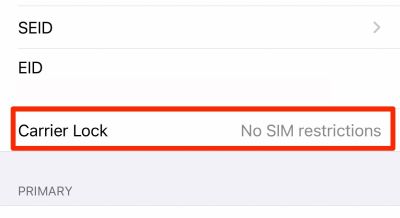
Go to Settings → General → About → Carrier Lock.
If it says "No SIM restrictions", you're good to go!
How to Check on Android:
Go to Settings → About Phone → SIM Status (or contact your carrier directly).
What to do if your phone is locked:
Request an unlock from your carrier before departing. Major carriers in North America (AT&T, Verizon, T-Mobile), Australia (Telstra, Optus), and the UK (EE, O2) allow online unlock requests if your device is fully paid off or contract fulfilled. Process time usually takes 1 to 3 business days.
Installing an eSIM profile and activating your plan are two distinct steps. Confusing the two can lead to losing plan days before even arriving in Japan, a frequent frustration noted in travel guides like Trip.com's Japan Wi-Fi & SIM guide.
With a CDJapan Rental eSIM, activating the profile allows you to complete installation. Even after installing, the usage period will not start counting down until your device actually connects to a cellular network in Japan (unless 30 days pass after activation). Setting it up before you board your flight ensures a smooth connection the moment you land.
Bonus Peace of Mind: Unlike many eSIM providers that lock QR codes after one scan, CDJapan Rental eSIMs allow re-installations on the same device. If something goes wrong during setup, you can retry without losing your profile.
Leaving your QR code buried in an unread email is a recipe for disaster—it might land in your spam folder or prove impossible to find without an internet connection at arrival.
With CDJapan Rental, your QR code is accessible anytime directly from your My Page account, completely independent of email delivery. You can also monitor your live data usage there at any time.
Action items before leaving home:
Travel eSIMs are data-only plans and do not support traditional SMS text messaging. Messaging apps like WhatsApp and LINE require SMS verification tied to a phone number during initial setup.
Travelers often switch to a data eSIM upon arriving in Japan, attempt to re-install or set up WhatsApp, and suddenly realize they cannot receive the SMS verification code. As one reviewer on Trustpilot noted: "The only issue was that I could not get any text messages."
Action items before leaving home:
For more details on using messaging apps seamlessly in Japan, check out our Detailed Guide to Using WhatsApp in Japan.
✏️ Author's Note: Checking these five items before you board will eliminate virtually all common eSIM headaches at Japanese airports. Pay special attention to Check #2 (SIM Lock)—if your device is locked, there is little support can do once you have landed. Having instant access to setup details via CDJapan's My Page gives you complete peace of mind without relying on email connectivity.
Get direct docomo 5G network connectivity with instant QR code delivery on your My Page.
Browse Japan eSIM Plans →Landed in Japan but your phone is stuck on "No Service" or "Out of Service"? Follow these quick troubleshooting steps in order.
According to industry troubleshooting guides from eSIMRated , "No Service" errors represent the vast majority of support requests—and nearly all can be resolved in under three minutes.
The fastest and most reliable first step. Turn Airplane Mode ON, wait 10 to 30 seconds, and turn it back OFF. This forces your phone's modem to re-scan for local Japanese cell towers.
Downloading an eSIM profile is not the same as enabling the cellular line.
On iPhone:
Go to Settings → Cellular (or Mobile Data) → Tap your eSIM plan → Toggle "Turn On This Line" to ON.
On Android (Samsung):
Go to Settings → Connections → SIM manager → Toggle your eSIM profile to ON.
This is a critical setting where rules vary depending on your eSIM provider:
| eSIM Type | Data Roaming Setting Required |
|---|---|
| Global Roaming eSIMs (Airalo, Holafly, etc.) | MUST BE ON |
| Local Direct-Connect eSIMs (CDJapan Rental) | KEEP OFF |
CDJapan Rental eSIMs connect directly to NTT docomo's native local network. Because it is a local connection, you do not need to turn Data Roaming ON. Turning roaming on unnecessarily can sometimes cause routing glitches.
Why Direct Connection Matters: Many global roaming eSIMs route your data traffic through overseas servers (such as Hong Kong or Singapore). This creates noticeable latency (ping delay), slowing down web browsing. More importantly, it assigns your phone an overseas IP address, which can cause local Japanese apps, ticket booking portals, or digital payment services to block your connection.
For business users and travelers wanting a seamless online experience, a direct local connection is strongly recommended. Read more in our article: Bought a Japan eSIM but Can't Connect?
Even if your eSIM line is turned on, your phone will not connect if "Cellular Data" is still set to your home primary SIM.
On iPhone:
Go to Settings → Cellular → Cellular Data → Select your Japan eSIM line.
On Android:
Go to Settings → Network & internet → SIMs → Set eSIM as Preferred SIM for Data.
If you previously used a local Japanese SIM/MVNO or another specialized travel eSIM on your phone, an old Configuration Profile might still be active. Old profiles hijack your phone's network settings and prevent new eSIMs from obtaining a data connection.
How to Check & Delete (iPhone):
If simple toggles fail, rebooting your device clears cached network parameters that Airplane Mode cannot reset. Once your phone reboots, wait about two minutes for it to establish a fresh handshake with local cellular towers.
If automatic network selection gets stuck searching, manually lock onto the local network provider as suggested in Gohub's troubleshooting guide.
On iPhone:
Go to Settings → Cellular → Network Selection → Toggle Automatic OFF → Select NTT docomo from the list.
On Android:
Go to Settings → Connections → Mobile networks → Network operators → Turn off automatic selection → Select NTT docomo.
If you've attempted all steps above without success:
✏️ Author's Note: Because CDJapan Rental eSIMs utilize a direct local connection to docomo, you won't run into Data Roaming confusion (Fix #3). If you ever encounter setup issues upon landing, simply hop onto airport Wi-Fi and message us through My Page—our Tokyo-based team is ready to assist.
*#06#Enjoy direct NTT docomo network access, instant QR delivery via My Page, and zero roaming setup required.
View Japan eSIM Plans →